
IBConsole
Smart CodeInsight features in IBConsole, which have been built leveraging RAD Studio SmartCore AI components – as IBConsole is written in Delphi, using VCL and the IBX components.
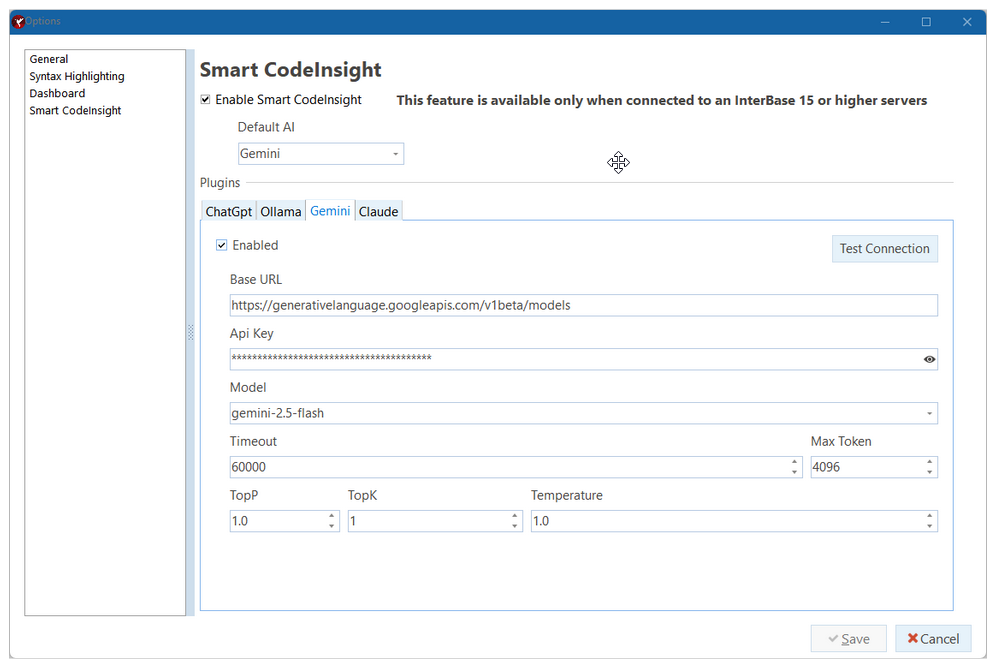
Multi-Engine AI Support
IBConsole Smart CodeInsight supports multiple AI engines and models, allowing organizations flexibility in choosing their preferred AI providers and configurations. Supported capabilities include:
- Configurable AI engines
- Model selection
- API-based integrations
- Connection testing
- Per-window engine selection
This architecture allows customers to adapt AI usage to their own security, compliance, and infrastructure requirements. Beside is an image of the Smart CodeInsight configuration dialog box.
AI-Powered SQL Assistance
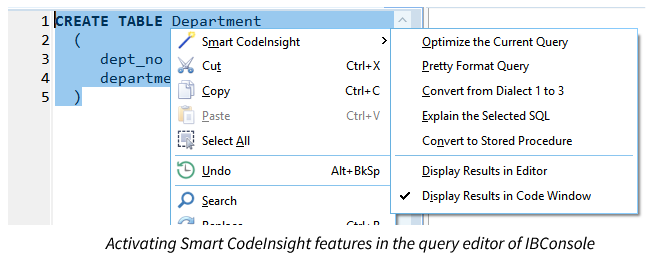
Users can interact with AI directly inside IBConsole using natural language prompts. The system supports contextual SQL generation, query explanations, formatting, optimization, and stored procedure generation.
Examples include:
- SQL query generation
- Query optimization recommendations
- SQL formatting and cleanup
- Query explanations
- SQL dialect conversion
- Stored procedure generation from SQL
As an example, you can select the text of a query and perform a number of different options on it.
Context-Aware Database Intelligence
A standout differentiator is IBConsole Smart CodeInsight’s metadata-aware AI prompting system. Instead of requiring users to manually describe database structures, IBConsole automatically injects schema metadata into prompts using intelligent macros. This enables the configured AI engine to understand:
- Tables
- Views
- Stored procedures
- Triggers
- Indices
- Domains
- Relationships
- Query plans
- Editor selections
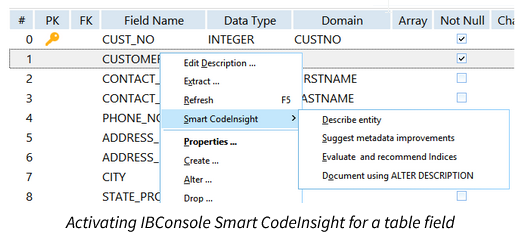
The result is dramatically more accurate and relevant AI responses for real-world database tasks. As you can see below, this feature is activated by selecting Smart CodeInsight command while an entity is selected, in this case a field of a table.
Built-In Metadata Macros
IBConsole Smart CodeInsight includes a powerful macro system that automatically expands database object metadata into AI prompts when using an AI chat window. Supported macros include:
- Tables
- Views
- Procedures
- Triggers
- Indices
- Functions
- Tablespaces
- Encryption metadata
- Selected SQL text
- Full editor contents
This removes the need for developers to manually copy and paste schema details into AI tools.
AI-Assisted Performance Optimization
The platform helps developers improve database performance through intelligent analysis of:
- SQL queries
- Query execution plans
- Index selectivity
- Table structures
- Metadata relationships
In these areas, IBConsole Smart CodeInsight can:
- Recommend index improvements
- Analyze query plans
- Suggest query optimizations
- Identify schema normalization opportunities
Automated Documentation Generation
IBConsole Smart CodeInsight can automatically generate descriptive metadata and documentation scripts using InterBase ALTER DESCRIPTION syntax.
This helps organizations:
- Improve database maintainability
- Accelerate onboarding
- Standardize documentation
- Preserve institutional knowledge
Interactive SQL Editor Integration
The AI assistant is deeply integrated into the Interactive SQL environment inside IBConsole. Developers can:
- Highlight SQL and request optimization
- Explain selected queries
- Reformat SQL automatically
- Convert SQL into stored procedures
- Convert legacy Dialect 1 SQL to Dialect 3
- Drag and drop schema objects directly into prompts
This creates a seamless AI-assisted development workflow without leaving the IDE.