
IBConsole
Die Smart CodeInsight-Funktionen in IBConsole wurden unter Verwendung der RAD Studio SmartCore-KI-Komponenten entwickelt – da IBConsole in Delphi unter Verwendung von VCL und den IBX-Komponenten geschrieben ist.
Unterstützung für Multi-Engine-KIs
IBConsole Smart CodeInsight unterstützt mehrere KI-Engines und -Modelle und bietet Unternehmen somit Flexibilität bei der Auswahl ihrer bevorzugten KI-Anbieter und -Konfigurationen. Zu den unterstützten Funktionen gehören:
- Konfigurierbare KI-Engines
- Modellauswahl
- API-basierte Integrationen
- Verbindungstest
- Auswahl der Engine pro Fenster
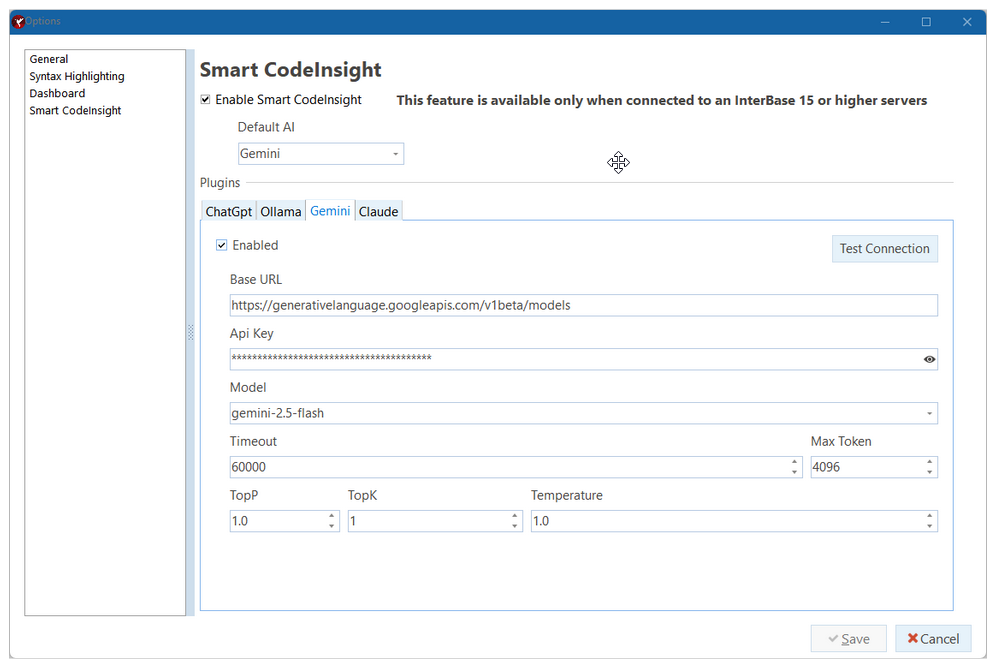
Diese Architektur ermöglicht es Kunden, den Einsatz von KI an ihre eigenen Anforderungen in Bezug auf Sicherheit, Compliance und Infrastruktur anzupassen. Nebenstehend sehen Sie eine Abbildung des Konfigurationsdialogfelds von Smart CodeInsight.
KI-gestützte SQL-Unterstützung
Benutzer können direkt in der IBConsole mithilfe von Befehlen in natürlicher Sprache mit der KI interagieren. Das System unterstützt die kontextbezogene SQL-Generierung, die Erläuterung von Abfragen, die Formatierung, die Optimierung sowie die Generierung von gespeicherten Prozeduren.
Beispiele hierfür sind:
- Erstellung von SQL-Abfragen
- Empfehlungen zur Abfrageoptimierung
- Formatierung und Bereinigung von SQL-Code
- Erläuterungen zu Abfragen
- Konvertierung von SQL-Dialekten
- Erstellung von gespeicherten Prozeduren aus der SQL Abfrage
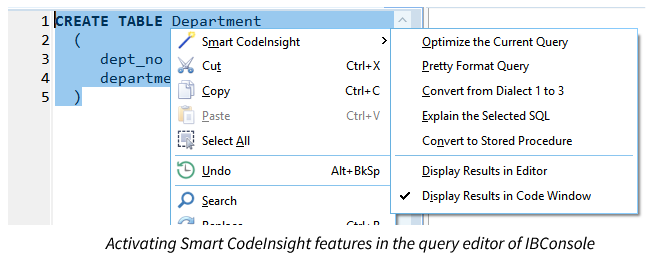
Sie können beispielsweise den Text einer Abfrage markieren und verschiedene Aktionen darauf anwenden.
Kontextbezogene Datenbankintelligenz
Ein herausragendes Alleinstellungsmerkmal ist das metadatenbasierte KI-Prompt-System von IBConsole Smart CodeInsight. Anstatt dass Benutzer Datenbankstrukturen manuell beschreiben müssen, fügt IBConsole mithilfe intelligenter Makros automatisch Schema-Metadaten in die Eingabeaufforderungen ein. Dadurch kann die konfigurierte KI-Engine Folgendes verstehen:
- Tabellen
- Views
- Stored procedures
- Trigger
- Indexe
- Domains
- Beziehungen
- Abfragepläne
- Auswahl im Editor
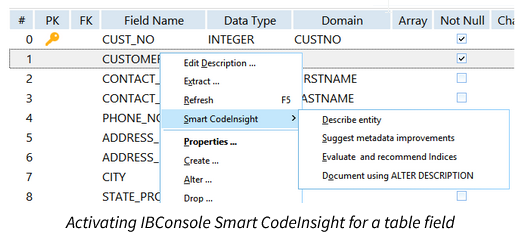
Das Ergebnis sind deutlich präzisere und relevantere KI-Antworten für reale Datenbankaufgaben. Wie Sie im Bild sehen können, wird diese Funktion aktiviert, indem Sie den Befehl „Smart CodeInsight“ auswählen, während eine Entität markiert ist – in diesem Fall ein Feld einer Tabelle.
Integrierte Metadaten-Makros
IBConsole Smart CodeInsight verfügt über ein leistungsstarkes Makrosystem, das bei der Verwendung eines KI-Chatfensters die Metadaten von Datenbankobjekten automatisch in KI-Eingabeaufforderungen umwandelt. Zu den unterstützten Makros gehören:
- Tabellen
- Views
- Prozeduren
- Trigger
- Indexe
- Funktionen
- Tablespaces
- Verschlüsselungsmetadaten
- Ausgewählter SQL-Text
- Gesamter Inhalt des Editors
Dadurch müssen Entwickler Schema-Details nicht mehr manuell in KI-Tools kopieren und einfügen.
KI-gestützte Leistungsoptimierung
Die Plattform unterstützt Entwickler dabei, die Datenbankleistung durch intelligente Analyse folgender Aspekte zu verbessern:
- SQL Abfragen
- Pläne zur Abfrageausführung
- Auswahl des Indexes
- Tabellenstrukturen
- Beziehungen zwischen Metadaten
In diesen Bereichen bietet IBConsole Smart CodeInsight folgende Funktionen:
- Verbesserungsvorschläge für den Index
- Abfragepläne analysieren
- Vorschläge zur Abfrageoptimierung
- Möglichkeiten zur Schemanormalisierung ermitteln
Automatische Dokumentenerstellung
IBConsole Smart CodeInsight kann mithilfe der InterBase-Syntax „ALTER DESCRIPTION“ automatisch aussagekräftige Metadaten und Dokumentationsskripte generieren.
Dies hilft Unternehmen dabei:
- Verbesserung der Wartbarkeit der Datenbank
- Das Onboarding beschleunigen
- Dokumentation vereinheitlichen
- Institutionelles Wissen bewahren
Integration des interaktiven SQL-Editors
Der KI-Assistent ist tief in die Interactive-SQL-Umgebung innerhalb der IBConsole integriert. Entwickler können:
- SQL markieren und Optimierung anfordern
- Erläuterungen zu ausgewählte Abfragen
- SQL automatisch umformatieren
- SQL in Stored Procedures umwandeln
- Legacy SQL-Anweisungen von Dialekt 1 in Dialekt 3 konvertieren
- Schemaobjekte direkt per Drag & Drop in den Prompt ziehen
Dadurch entsteht ein nahtloser, KI-gestützter Entwicklungsworkflow, ohne dass man die IDE verlassen muss.