
Für den RAD Studio-Workflow entwickelt
Kai ist kein gewöhnliches KI-Fenster, das neben Ihrer IDE platziert wird. Es ist in RAD Studio integriert, sodass Entwickler weiterhin direkt mit dem Quellcode, den Designern, den Compilern und der Projektstruktur arbeiten können, die sie bereits nutzen.
Neuerungen in Kai 1.1
Neue KI-Integrationen
Über die ACP-Registrierung haben Sie Zugriff auf mehr als 40 KI-Agenten , darunter bereits vorhandene Integrationen wie Claude, GPT-5 und Gemini CLI sowie neuere Optionen wie Antigravity, Grok, Mistral, Cursor, Devin, Kilo Code und Junie.
Agentenverwaltung
Suchen, installieren und aktualisieren Sie unterstützte KI-Agenten direkt über Kai, wobei neue ACP-Registry-Agenten verfügbar werden, ohne dass ein Kai-Update erforderlich ist.
Benutzeroberfläche
Freuen Sie sich auf eine neu gestaltete Kai-Umgebung mit optimierten Abständen, einfarbigen Symbolen, einer neuen Chat-Symbolleiste, übersichtlicheren Einstellungsseiten und einheitlicheren Bedienelementen.
Lokale KI
Nutzen Sie den neuen Native LM Studio ACP-Agent, um sowohl mit LM Studio als auch mit Ollama reibungsloser mit lokalen Modellen zu arbeiten.
Sitzungen
Die Sitzungsverwaltung läuft nun über ACP, wobei es eine Option „Sitzungen importieren“ gibt, mit der Active-Engine-Sitzungen in die Kai-Chat-Umgebung übernommen werden können.
Verbesserte Authentifizierung
Die Authentifizierung wurde verbessert und überarbeitet, sodass sie nun über eine ACP-basierte Authentifizierung und OAUTH-Unterstützung abgewickelt wird. Dadurch können die unterstützten Anmeldemethoden direkt von jedem verbundenen KI-Agenten abgerufen werden.
Qualität
Kai 1.1 behebt zahlreiche von Kunden gemeldete Probleme, die das Chat-Verhalten, das Scrollen, Popups, die Leistung, die Reaktionsgeschwindigkeit der Benutzeroberfläche, die Authentifizierung und die Verfügbarkeit von Modellen betreffen.
Mehr als nur Autovervollständigung
Kai vereint Inline- KI-Vorschläge, ein andockbares Agenten-Chat-Fenster, projektbezogenen Kontext und MCP-gestützte Workflows. Das bedeutet, dass Sie um Hilfe bitten, Vorschläge prüfen, Änderungen übernehmen, das Projekt erstellen, die Compiler-Ausgabe überprüfen und weiterarbeiten können, ohne zwischen unzusammenhängenden Tools hin- und herspringen zu müssen.
Kai hilft dabei:
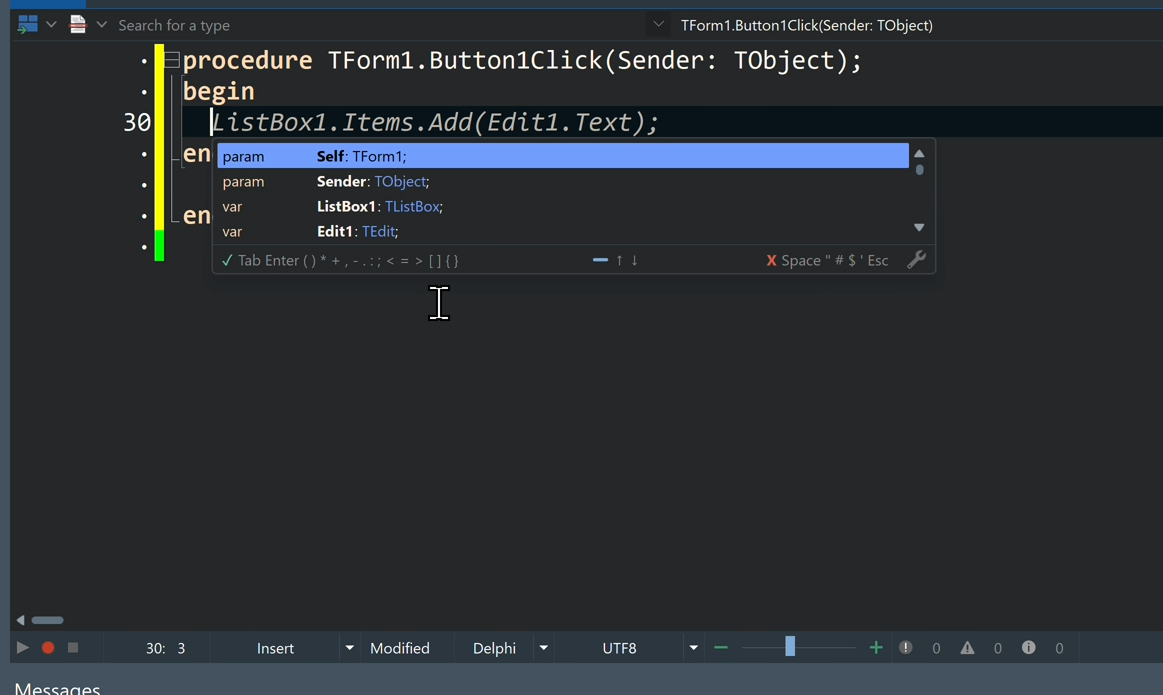
- Ihren inline Code mit Ghost Text zu vervollständigen
- KI-Vorschläge in RAD Studio CodeInsight zu nutzen
- Mehrere Code-Optionen in der Code-Vervollständigung zu vergleichen
- Mit einem KI-Agenten zu chatten, der den Projektkontext versteht
- UI-Formulare zu erstellen und Steuerelemente zu konfigurieren
- Projekte zu kompilieren und Compiler-Meldungen zu überprüfen
- Fehler und Warnungen mit Hilfe einer KI-gestützten Anleitung zu beheben
- Bestehenden Delphi- und C++Builder-Code umzugestalten und zu modernisieren
Die Autovervollständigung ist nützlich. Kai geht noch einen Schritt weiter.
Warum Kai mit RAD Studio?
RAD Studio bietet Entwicklern bereits eine bewährte Plattform für die Entwicklung nativer Anwendungen: VCL für Windows, FMX für plattformübergreifende Benutzeroberflächen, visuelles Design, native Compiler, FireDAC-Datenzugriff, RAD Server, WebStencils sowie Unterstützung für Desktop-, Mobil-, Server- und webbasierte Anwendungen. Kai erweitert diese Umgebung um agentenbasierte KI, sodass Entwickler schneller vorankommen können, ohne die Plattform verlassen zu müssen.
Bleiben Sie im Flow
Alles innerhalb von RAD Studio erledigen; verwandeln Sie Prompts in funktionierenden Code, Builds und Fehlerbehebungen, ohne Ihren Workflow zu unterbrechen.
Clevere Programmierung bereits integriert
Steigern Sie Ihre Produktivität mit KI-gestützter Inline-Autovervollständigung und umfangreichen Code-Vorschlägen, die sich wie eine natürliche Erweiterung Ihres Editors anfühlen.
Benutzeroberflächen, funktionsfähige Prototypen und Apps erstellen
Beschreiben Sie Ihre Idee und lassen Sie Kai im Handumdrehen einsatzbereite, plattformnative Oberflächen, interaktive Prototypen und funktionierende Anwendungen erstellen.
Modernisieren Sie Ihren Code
Wenn Sie bereits über eine Anwendung verfügen, kann Kai Ihnen dabei helfen, den Code und die Benutzeroberfläche zu modernisieren sowie bestehende Codebasen unter Nutzung neuer Sprach- und Framework-Funktionen zu überarbeiten.
Flexibilität beim Modell, ohne gebunden zu sein
Über die ACP-Registry haben Sie Zugriff auf mehr als 40 KI-Agenten, darunter Claude, GPT-5, Gemini CLI, Antigravity, Grok, Mistral, Cursor, Devin, Kilo Code und Junie.
Von Grund auf für den Einsatz in Unternehmen konzipiert
Keine Proxy-Ebene über Embarcadero-Server. Keine zwingende Abhängigkeit von der Cloud. Ihr Code bleibt unter Ihrer Kontrolle, mit lokalem Speicher und direkter Modellkommunikation.
Lokale Modelle für maximalen Schutz
Wenn Datenschutz oberste Priorität hat, nutzen Sie Kai vollständig offline mit lokalen LLMs, um einen maximalen Schutz geistigen Eigentums und die Einhaltung gesetzlicher Vorschriften zu gewährleisten.
Wählen Sie das passende Modell
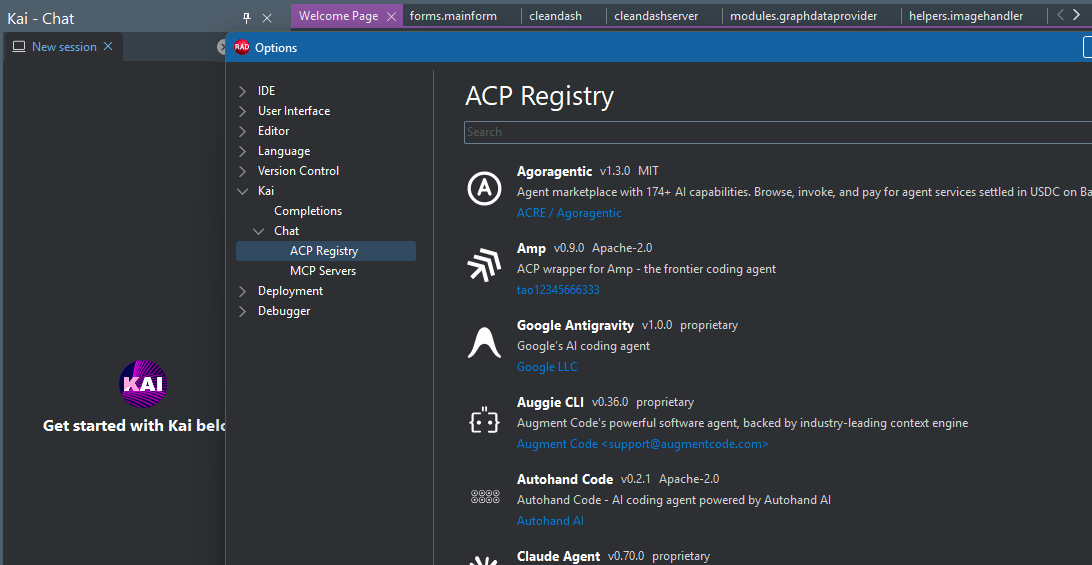
Kai 1.1 bietet Entwicklern mehr Flexibilität bei der Auswahl der KI-Tools, die zu ihrem Arbeitsablauf passen. Dank der neuen ACP-Registry-Integration bietet Kai Zugriff auf über 40 KI-Agenten, darunter bekannte Optionen wie GitHub Copilot, OpenAI, Anthropic Claude, Google Gemini CLI sowie weitere Agenten wie Antigravity, Grok, Mistral, Cursor, Devin, Kilo Code und Junie. Agenten können direkt über Kai gefunden, installiert und aktualisiert werden, während neue Optionen über die Registry verfügbar werden können, ohne dass eine neue Kai-Version erforderlich ist.
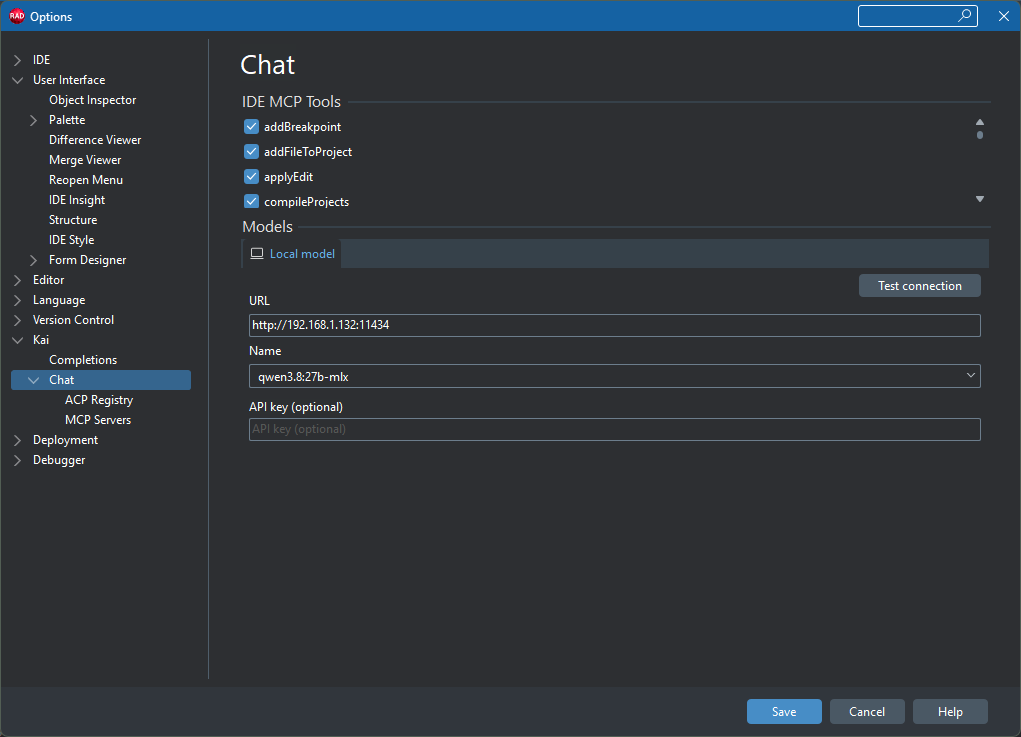
Für Entwickler, die lokale KI bevorzugen, führt Kai 1.1 außerdem den neuen „Native LM Studio ACP“-Agenten ein, der sowohl LM Studio als auch Ollama unterstützt. Dies bietet zusätzliche Flexibilität für Entwicklungsabläufe, bei denen lokale Modelle bevorzugt werden.
Für Quellcodeverwaltung und Datenschutz optimiert
Kai bietet Entwicklern einen praktischen Weg zur KI-gestützten Entwicklung, ohne dass sie die Kontrolle abgeben müssen. Sie können jeden Vorschlag prüfen, Chat-Sitzungen lokal speichern, mit lokalen KI-Modellen arbeiten und den Modellpfad wählen, der den Datenrichtlinien Ihres Teams entspricht. Dank der Unterstützung lokaler Modelle bleiben Code und Unterhaltungen auf Ihrem Rechner oder in Ihrer Netzwerkinfrastruktur.
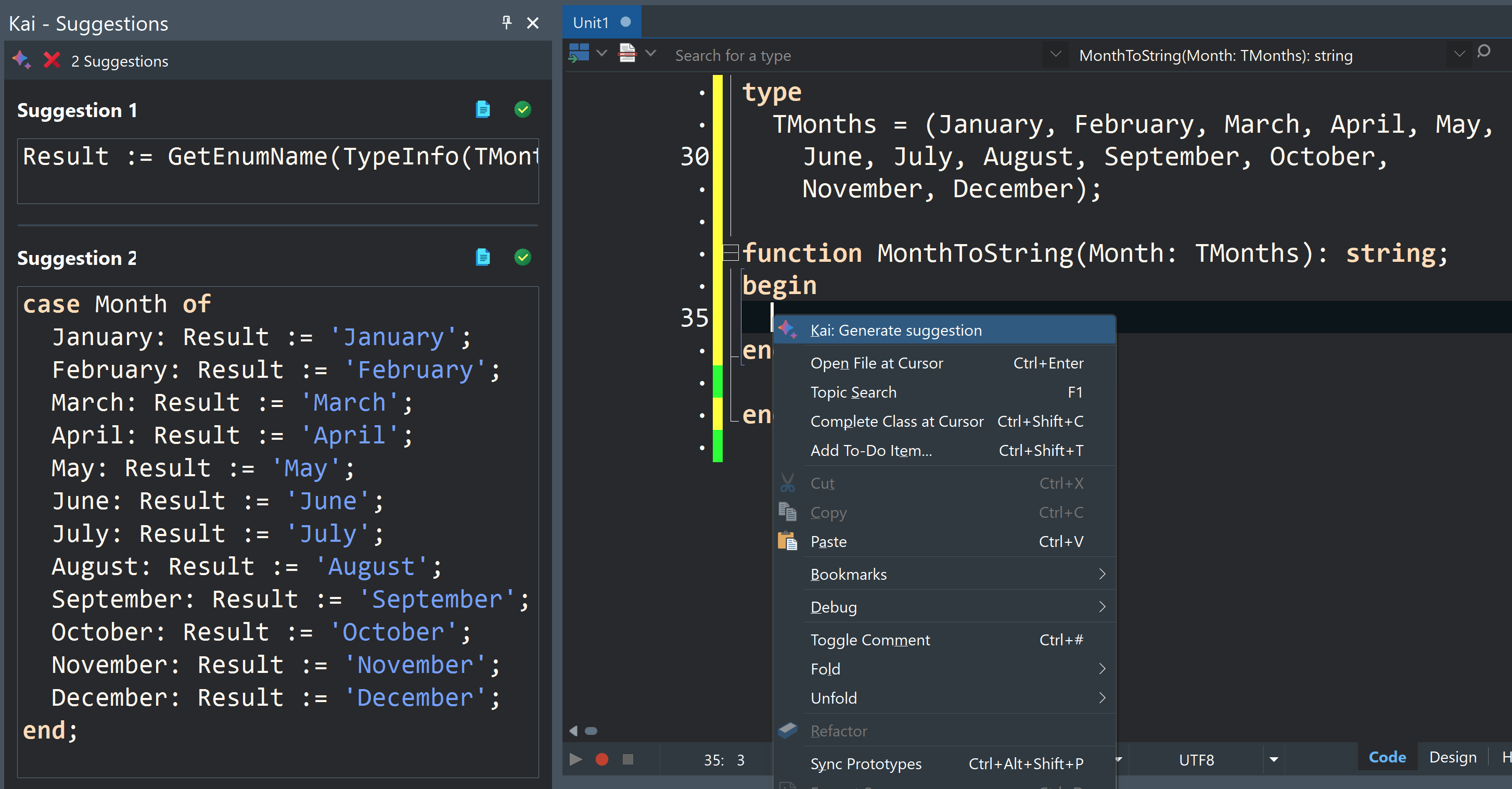
Für Modernisierung und Migration konzipiert
Viele RAD Studio-Entwickler beginnen nicht mit einer leeren Datei. Sie warten, aktualisieren und erweitern wichtige bestehende Delphi- und C++Builder-Anwendungen.
Kai kann Ihnen dabei helfen, Ihren bestehenden Code zu erklären, Refactorings vorzuschlagen, UI-Muster zu aktualisieren, Sie bei Modernisierungsaufgaben zu unterstützen und Migrationsarbeiten zu begleiten. In Verbindung mit RAD Studio 13.1 können Teams zudem von der Unterstützung neuerer Plattformen, Windows 11-VCL-Stilen, der Unterstützung für Windows auf ARM, Android API 36.1, der Unterstützung für iOS 26, DelphiLSP LSIF und aktualisierten Web-Tools profitieren.
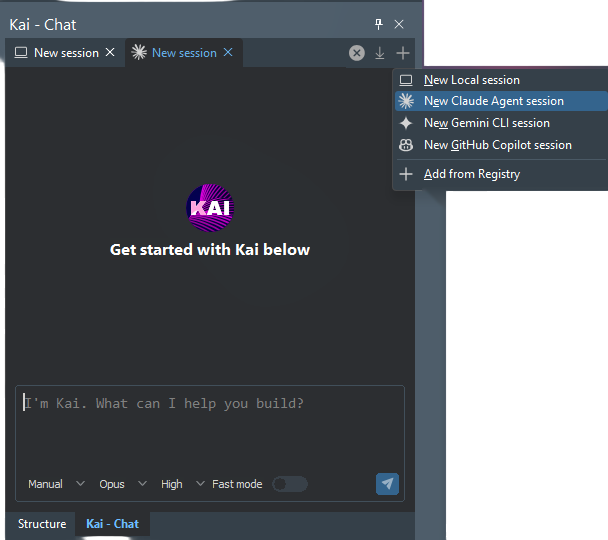
Entwickelt für ein wachsendes KI-Ökosystem
Kai 1.1 erleichtert es Ihnen, die gewünschten KI-Tools direkt in Ihren RAD Studio-Workflow zu integrieren. Starten Sie eine neue Sitzung mit einem installierten Agenten, wechseln Sie je nach Aufgabe zwischen verschiedenen KI-Optionen oder entdecken und fügen Sie über die ACP-Registrierung weitere Agenten hinzu. Mit Zugriff auf über 40 Agenten und einer Registrierung, die so konzipiert ist, dass sie erweitert werden kann, sobald neue Optionen verfügbar werden, kann sich Ihre KI-Entwicklungsumgebung weiterentwickeln, ohne an einen festen Satz von Integrationen gebunden zu sein. Kai vereint diese Auswahl in einer einheitlichen Benutzererfahrung innerhalb von RAD Studio und hilft Entwicklern so, weniger Zeit mit der Verwaltung separater KI-Tools zu verbringen und mehr Zeit für die Erstellung, Verbesserung und Modernisierung von Anwendungen zu nutzen.
Wie Kai Ihren Arbeitsablauf bereichert
Code schreiben
Inline-Vorschläge, Ghost Text, CodeInsight-Vervollständigungen
Optionen überprüfen
Panels mit mehreren Auswahlmöglichkeiten
Ein Projekt verstehen
Agenten-Chat mit Projektkontext und Dateiverweisen
Erstellung
Workflow direkt in der IDE kompilieren
Fehler beheben
Analyse der Compiler-Ausgabe mit Lösungsvorschlägen
Modernisierung
Refactoring, Aktualisierung der Benutzeroberfläche und Unterstützung bei der Migration
Erweiterung von Arbeitsabläufen
Integration mit externen Tools und Kontext
So testen Sie Kai
Besitzen Sie eine Named User Lizenz (keine ELC-Lizenz) für RAD Studio 12 oder 13?
Laden Sie Kai über GetIt oder das Customer Portal herunter und lösen Sie Ihre Kai-Testlizenz auf der Einlöseseite ein
Kai-Testversion – EinlöseseiteVerfügen Sie über eine Netzwerk- oder Concurrent-Lizenz mit aktiver Wartung?
Wenden Sie sich an den Vertrieb, um Ihre Kai-Testlizenz zu erhalten.
VertriebIch bin Neukunde oder habe keine aktuelle Lizenz
Installieren und testen Sie die neueste Version von RAD Studio. Ihre RAD Studio-Testversion enthält eine Kai-Testversion.
RAD Studio-Testversion herunterladenMöglichkeiten zum Kauf von Kai
Ich bin ein Kunde mit Wartungsvertrag
Wenn Sie über eine RAD Studio-, Delphi- oder C++Builder-Lizenz verfügen, für die der Support- und Wartungsvertrag noch gültig ist: Wenden Sie sich an den Vertrieb und beantragen Sie eine neue Kai-Lizenz.
VertriebIch bin ein Kunde ohne Wartungsvertrag
Wenn Sie über eine abgelaufene RAD Studio-, Delphi- oder C++Builder-Lizenz verfügen (Support & Maintenance): Wenden Sie sich an den Vertrieb, um Ihr Abonnement zu aktivieren und Ihre Kai-Lizenz zu erhalten.
VertriebIch habe noch keine Lizenz
Sie können ein Kai-Abonnement zusammen mit einer neuen RAD Studio-, Delphi- oder C++Builder-Lizenz erwerben, indem Sie die entsprechende Option im Web Store auswählen oder sich beim Kauf einer neuen Lizenz an den Vertrieb wenden.
Jetzt kaufenKai 1.1 Häufig gestellte Fragen
Kai 1.1 führt eine bedeutende architektonische Neuerung ein, deren Kern die Agent Client Protocol (ACP)-Registrierung bildet. KI-Integrationen werden nun aus der öffentlichen ACP-Registrierung heruntergeladen, anstatt direkt in Kai integriert zu sein. Dadurch erhalten Nutzer Zugang zu einem wachsenden Ökosystem von KI-Agenten, das bereits eine riesige Sammlung von derzeit über 40 verfügbaren Agenten umfasst, darunter neue Optionen wie Antigravity, Grok, Mistral, Cursor, Devin, Kilo Code und Junie. Es kommen regelmäßig weitere hinzu. Kai 1.1 bietet außerdem eine neu gestaltete Benutzeroberfläche, eine verbesserte Chat-Qualität, erweiterte Unterstützung für lokale KI sowie zahlreiche Verbesserungen der Benutzerfreundlichkeit.
Das ACP-Register ist ein öffentliches Register für KI-Agenten, das Kai 1.1 zur Verwaltung seiner Integrationen nutzt. Anstatt mit einem festen Satz an Integrationen ausgeliefert zu werden, kann Kai Agenten aus dem Register ermitteln und installieren. Benutzer können nach Agenten suchen, diese installieren und Updates erhalten, sobald neuere Versionen verfügbar sind. Neue Agenten können ebenfalls über das Register verfügbar werden, ohne dass eine neue Kai-Version erforderlich ist.
Kai 1.1 bietet derzeit über die ACP-Registrierung Zugriff auf mehr als 40 KI-Agenten. Die Registrierung umfasst sowohl Agenten, die bereits zuvor von Kai unterstützt wurden, als auch neuere Optionen wie Antigravity, Grok, Mistral, Cursor, Devin, Kilo Code und Junie. Es wird erwartet, dass die Registrierung weiter wächst, sobald weitere Agenten verfügbar werden.
Ja. Mit Kai 1.1 wird ein Native LM Studio ACP AI-Agent eingeführt. Trotz seines Namens unterstützt dieser Agent sowohl LM Studio als auch Ollama und bietet damit eine erweiterte Unterstützung für lokale KI-Engines.
Kai 1.1 bietet eine umfassende Überarbeitung der Benutzeroberfläche, darunter monochrome Symbole und Glyphen, verbesserte Abstände, eine neue Chat-Symbolleiste, übersichtlichere Konfigurationsseiten, ein einheitlicheres Erscheinungsbild des Bearbeitungsbereichs sowie neue Kontrollkästchen für boolesche Optionen. Die Änderungen sollen dazu beitragen, dass die Funktionen von Kai leichter zu finden und zu nutzen sind, und gleichzeitig die Benutzeroberfläche stärker an die Benutzeroberfläche und das Verhalten von RAD Studio angleichen.
Öffnen Sie die ACP-Registrierungskonfigurationsseite in Kai und suchen oder filtern Sie die verfügbaren Agenten. Wählen Sie einen Agenten aus und klicken Sie auf Installieren. Binäre Agenten können automatisch heruntergeladen und entpackt werden. Für Agenten, die über NPX oder UVX bereitgestellt werden, ist möglicherweise eine zusätzliche Bestätigung erforderlich, und die entsprechende zugrunde liegende Technologie, wie beispielsweise Node.js oder Python, muss bereits installiert sein.
Nein. Die ACP-Registrierungsarchitektur von Kai 1.1 ermöglicht es, Agenten unabhängig von der Kai-Installation hinzuzufügen. Neue Agenten können über die Registrierung bereitgestellt werden, ohne dass eine neue Kai-Version erforderlich ist. Installierte Agenten können zudem direkt aktualisiert werden, sobald neuere Versionen verfügbar sind.
Kai 1.1 führt architektonische Änderungen ein, die zu Kompatibilitätsproblemen mit Konfigurationen und CLI-Versionen von Drittanbietern führen können, die mit Kai 1.0.x verwendet werden. Bestehende Nutzer sollten vor dem Upgrade die Migrationshinweise lesen. Ein Kompatibilitätsproblem bei der OpenAI-Codex-Integration, das mit SQLite zusammenhängt, lässt sich beispielsweise beheben, indem der Ordner „.codex“ unter dem Benutzerkonto gelöscht und der Vorgang neu gestartet wird.
Die Migrationsdokumentation finden Sie unter hier erhältlich.
Kai 1.1 behebt zahlreiche von Kunden gemeldete und interne Probleme, insbesondere im Zusammenhang mit der Chat-Erfahrung. Die Verbesserungen betreffen Probleme mit unerwünschten Popups, dem Scrollen im Chat, dem Verhalten der Befehlspalette, der Leistung bei größeren Texten, der Reaktionsgeschwindigkeit der Benutzeroberfläche während der Entscheidungsfindung des Agenten, der Modellverfügbarkeit, der Authentifizierungsmeldung sowie weiteren chatbezogenen Problemen.
Mit Kai 1.1 werden das Laden von Sitzungen und die Authentifizierung auf ACP verlagert. Sitzungen werden nicht mehr vorab geladen; Benutzer können die neue Funktion Sitzungen importieren nutzen, um Sitzungen aus dem Arbeitsverzeichnis der aktiven Engine in Kai zu übertragen. Auch die Authentifizierungsmethoden werden direkt vom Agenten abgerufen.